
Reads the files as-is
KaraFun KFN with lyrics and timing, CD+G with their pictures, EMZ and LRC with lyrics, MP4 and AVI with video, and plain audio. Nothing needs to be converted before an evening.
KFN, CD+G, EMZ, MP4, AVI and audio. Words on the room’s screen, the queue on the laptop, requests from phones in the room. The words, the queue and requests over Wi-Fi work without the internet.
One Mac build for Intel and Apple silicon. Windows 10 and 11, 64-bit. What changed in each version
Free to sing. Hosting an evening requires the licence.
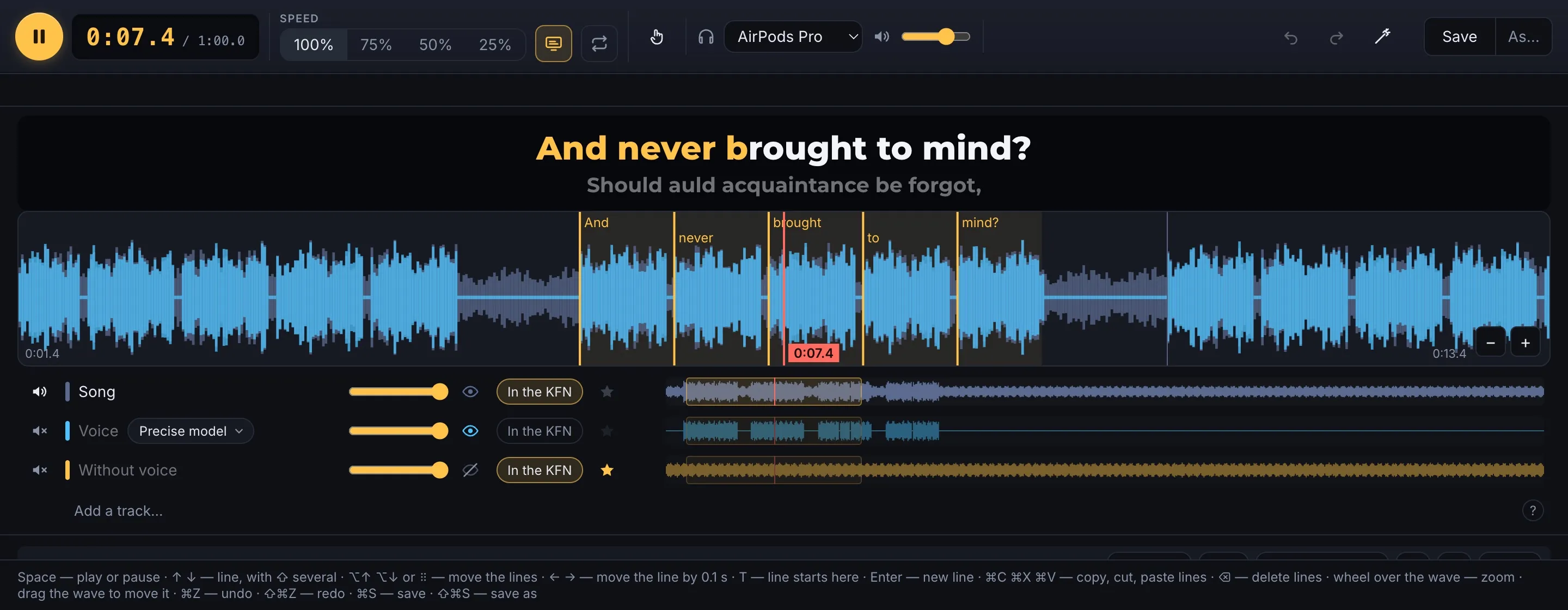
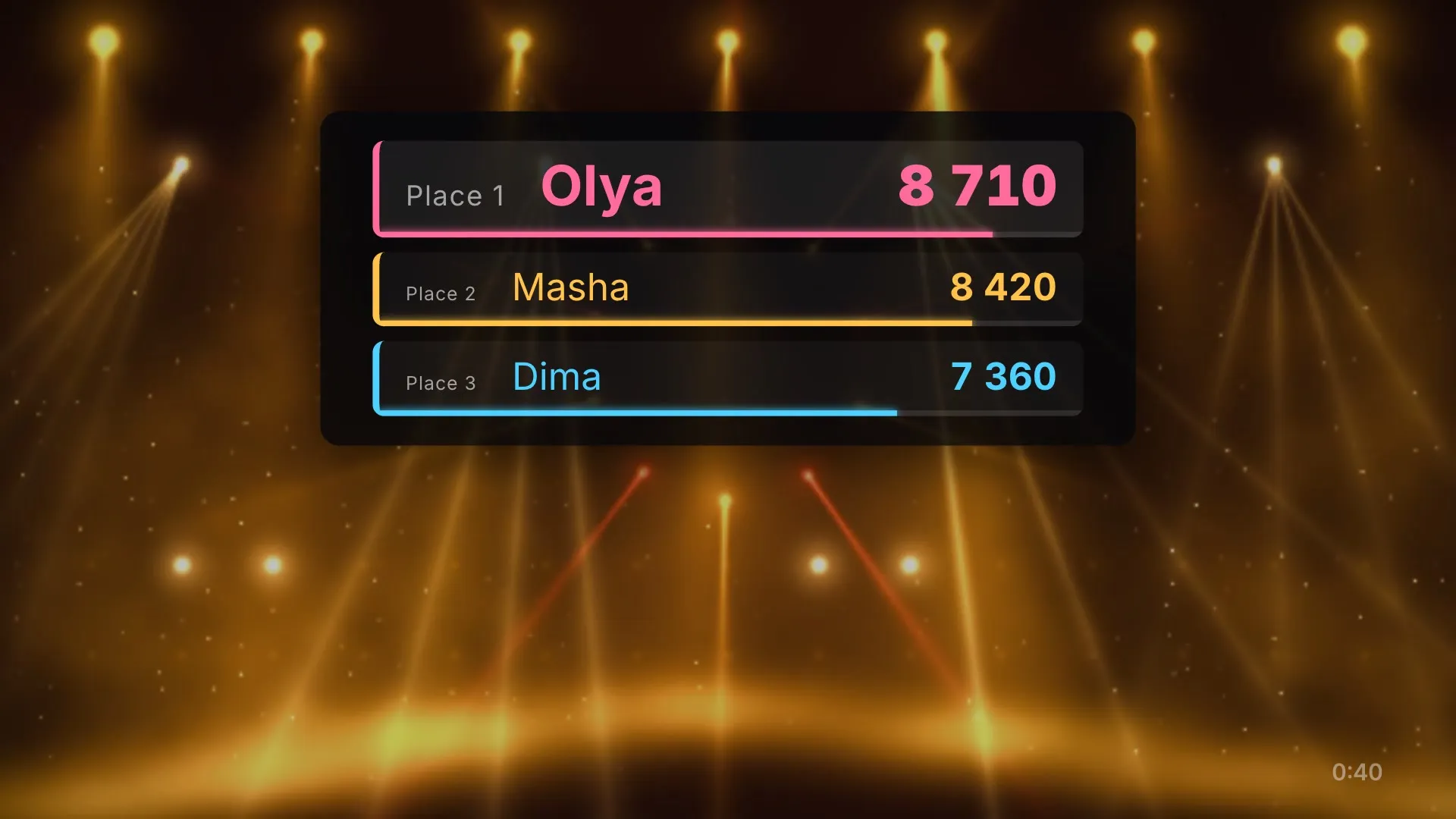
Singers sing one song: two into the microphones, guests into their own phones. The program hears each of them and scores them against the song’s notes. On the room’s screen each singer has a tile with their points and a lane of notes of their own; after the song, the podium.
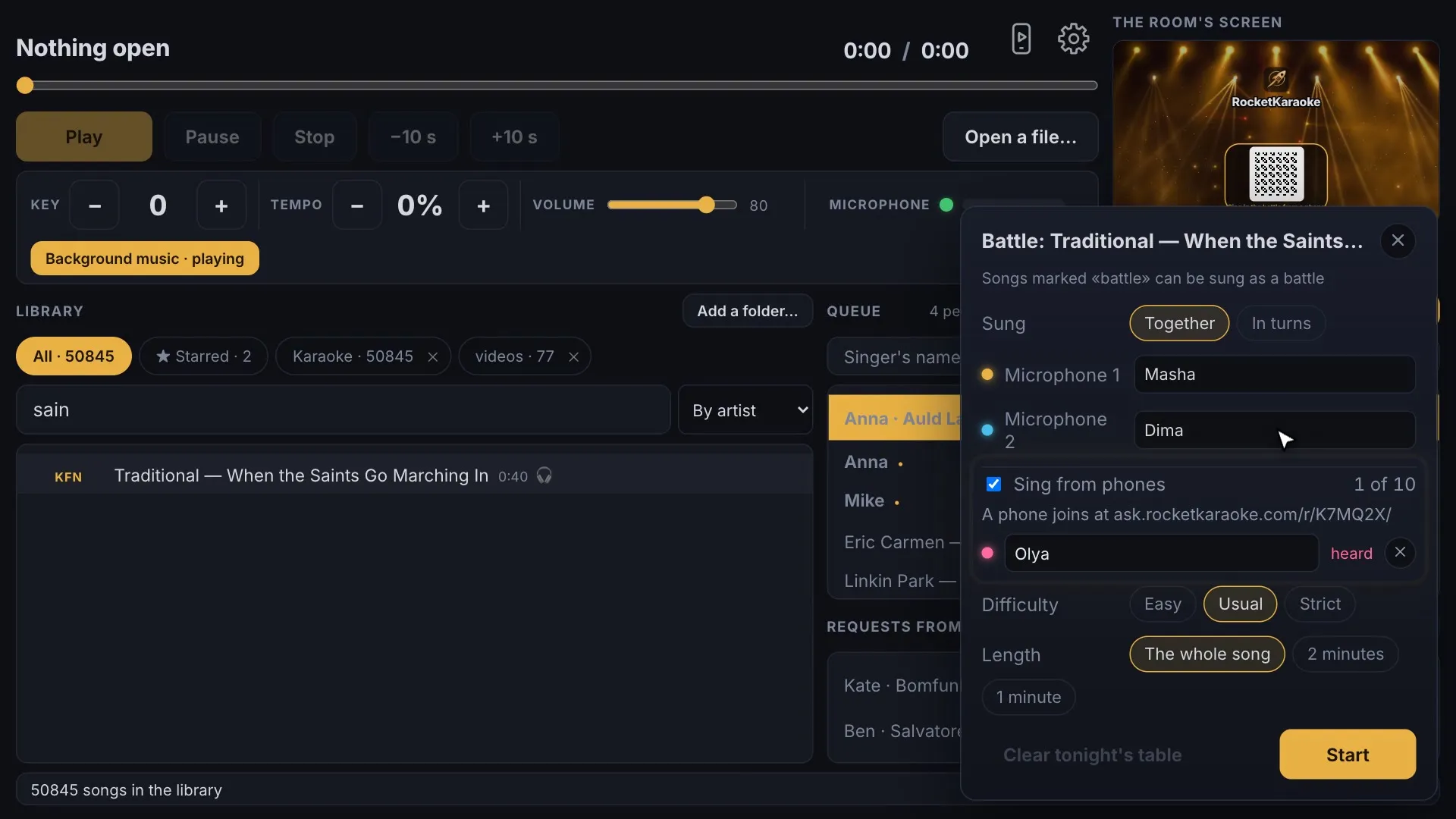
For a recording with no karaoke version, the program makes the karaoke itself, on the same computer: one neural network takes the voice out, another times the lyrics to the voice, and the editor finishes the result and saves a KFN. The song and its lyrics are sent nowhere: the models are downloaded once, and «Find the lyrics» asks LRCLIB by the artist, the title and the song's length. It runs on a Mac with an Apple processor and on Windows.
The right button on a song, then "Take the voice out". The song opens as two tracks, without the voice and the voice. Free.
"Time the lyrics to the voice…", paste the song's text: every word gets its time, an LRC appears beside the song, and the words play on the room's screen. Free.
Move a word's mark or tap the words in, take the voice out again with the other model or subtract your own backing track from the song — and save it all as one KFN. With the licence.
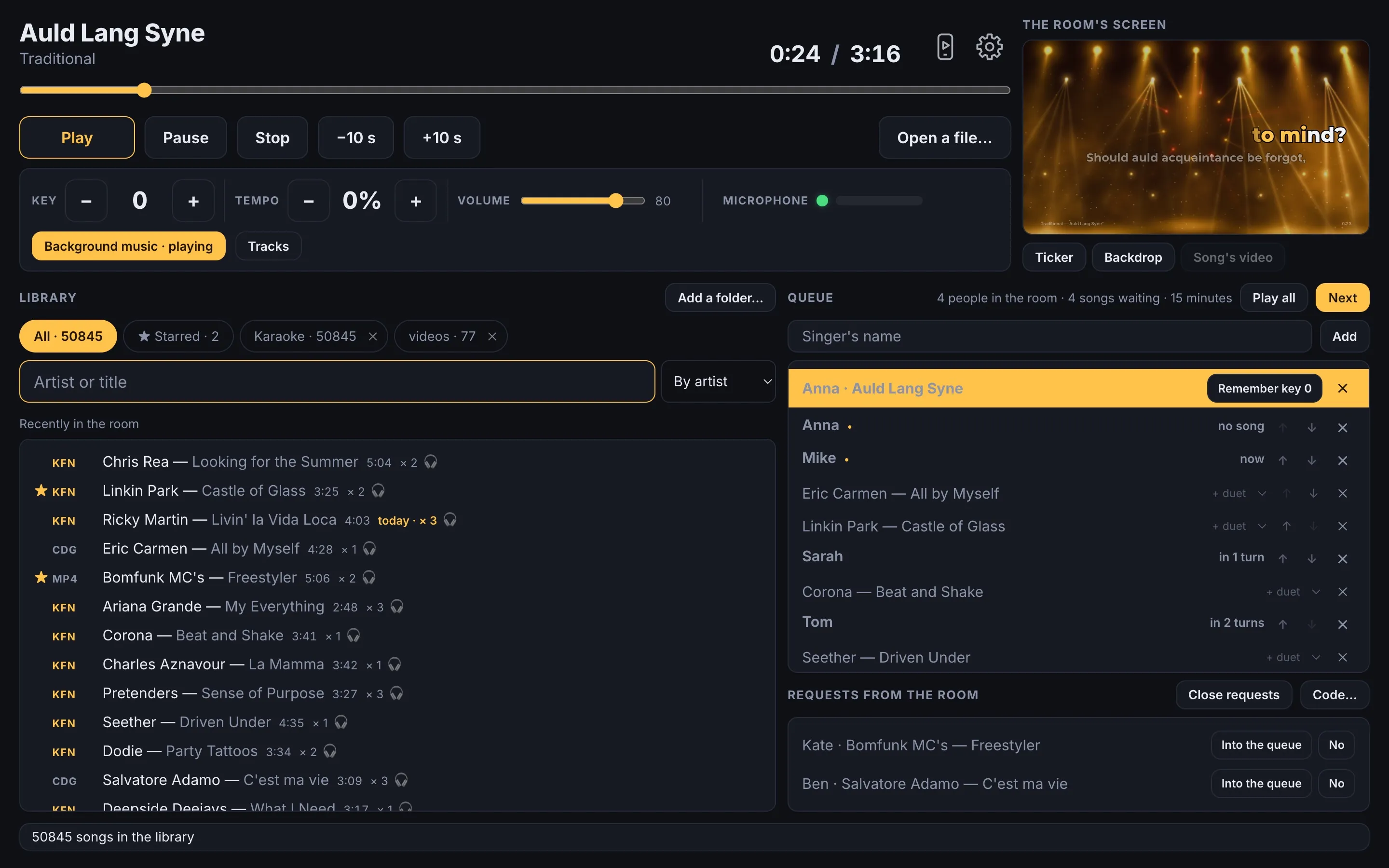
The program on a host’s laptop and what it shows on the room’s screen.
KaraFun KFN with lyrics and timing, CD+G with their pictures, EMZ and LRC with lyrics, MP4 and AVI with video, and plain audio. Nothing needs to be converted before an evening.
Point it at a folder. One host’s index contains more than 50,000 songs, and a search in it answers in about twenty milliseconds. A song can be starred, and the list put in order by artist, by title, or starred first. The right button on a folder, «Starred» or «All» saves its song list as an Excel workbook: artist and title, each song once. The same menu has «Read the folder again» and «Read every folder again»: new files join the list, missing ones leave it; a folder that is not there is not read.
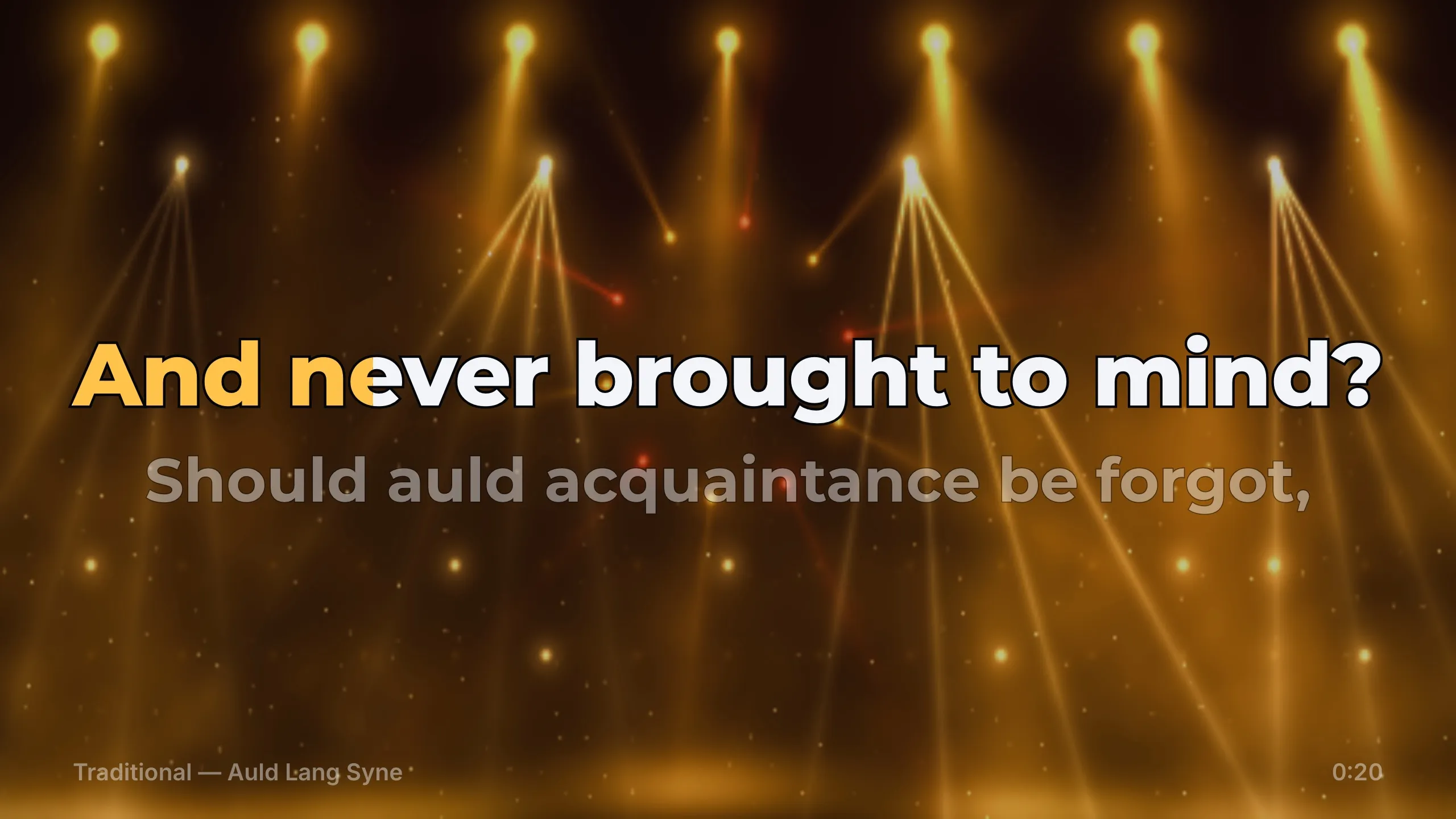
A second display, or several displays, with the line lit in time with the song. The video behind the words comes from your own folder or from the file itself; until clips are chosen, the screen draws a backdrop of its own — clouds, sparks, bokeh, beams, a concert's lights or aurora, moving with the song — or shows a picture of your own; for a KFN with a video of its own, the «Song's video» button under the room's screen swaps one for the other until the song ends. In a KFN duet each singer’s lines are in a colour of their own, and the lines sung together in a third. The settings take the colours of the sung words and of the words before they are sung, the typeface — one of six shipped with the program — where the lines stand on the screen: at the top, in the middle or at the bottom, and how many there are: two or three; a line comes on rising, fading in or at once; after an instrumental a line is counted in — dots, numbers, fireworks of numbers or a bar. The «Words ahead of or behind the sound» slider moves the wipe against the sound by up to half a second either way, for what the screen and the speakers add.
Key and tempo change while the song plays. When a file carries several audio tracks — the instrumental, a guide vocal — each has its own level control.
On a Mac with an Apple processor and on Windows: the right button on a song, in the library or the queue, then "Take the voice out". The program works in the background, and the foot of the console shows how far it is. The song then opens as two tracks, without the voice and the voice, and the voice's level is chosen: "Out", "Quiet" or "As recorded". There are two models, and the program marks the one that suits the computer: "Precise", BS-RoFormer Karaoke by frazer and becruily, 209 MB; "Fast", UVR-MDX-NET Karaoke 2 by Ultimate Vocal Remover and its developers, 53 MB, for weak computers. The model is downloaded once, after the "Download" button; on Windows the libraries it runs on come with it once. In the editor, with the licence, the voice is taken out again with the other model, or your own backing track is subtracted from the song.
For a song whose voice is taken out: the right button on it, "Time the lyrics to the voice…", paste the song's text. The GigaAM model listens to the voice and gives every word its time; a line the recording does not have is skipped, and a line longer than 32 characters is cut where the singer is silent longest. The result is an LRC file beside the song, which the program then plays with the words on the room's screen; an earlier LRC is kept beside it as ".before.lrc". There are two models, "Fast" and "Precise"; the first time, the program shows each one's size and the free memory it needs, and marks "Precise" on a computer with 16 GB of memory or more.
Singers sing one song — into the microphones and into their own phones — and the program scores each against the song’s notes. Up to ten together, up to eight in turns. On the room’s screen, tiles with the points, lanes of notes and the podium; the evening’s battles in «Tonight’s table». With a licence; on the trial evenings, on the microphones and on phones, up to three.
"Open in the editor" on a song opens a window with the voice's and the song's waves and the song's lines; above the wave, the line lit as the room's screen will show it. A click on the wave plays from there; a word's mark is dragged to its place; a line is cut, joined, moved by 0.1 second or given its start with the T key; "Tap the words in" starts the words with the space bar while the song plays. The song plays in the headphones — or on the room's output while no song is open in the room — at 100, 75, 50 or 25 % speed. The "Song lyrics" button: paste the lyrics or find them in LRCLIB by artist, title and length, and time them to the voice; if the voice is not taken out yet, that comes first. Under the wave are the tracks: each is heard or not, at its own level, with its wave shown or not; a track can be added from a file, put under the song in time, and «Align the tracks» moves a KFN's tracks under the main one where their sound matches. A KFN duet opens with its singers, a mark on each line. The editor saves an LRC, or a KFN: from a KFN, the same file with the new words and every part unencrypted; from any other song, a new KFN with the song without its voice and the song as recorded, both MP3.
The microphone goes into the same output as the music, with a gate, echo, reverb, a level meter, and a switch that turns the microphone off in the room.
Singers and their songs, or one playlist instead; two orders of turns — round the room, or the singer who has waited longest — duets, and an undo for a song removed by mistake. The archive remembers who came, what they sang and in which key.
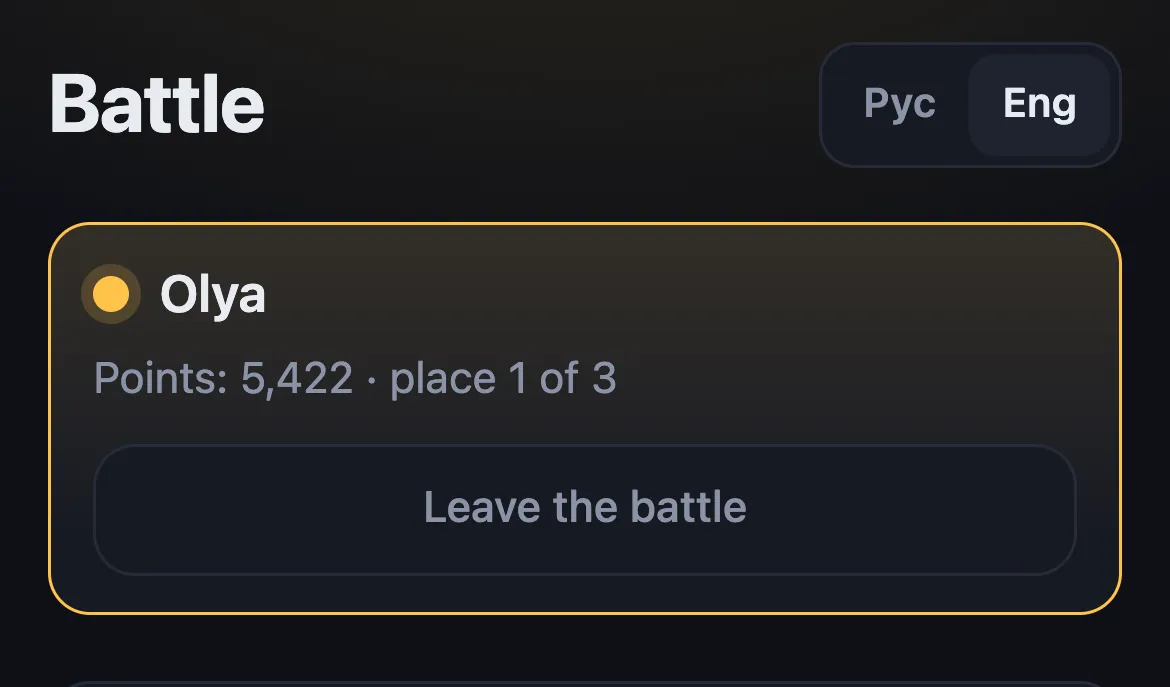
A guest scans the QR code on the wall and opens the page — over the venue’s Wi-Fi, or through our server when “Requests through the internet” is on, which comes with the licence — types a name, finds a song and submits a request. The request lands on the host’s list; the host accepts or declines it, and the guest sees the answer on the phone. The page opens in the phone’s language, with a Рус and Eng switch at the top.
With the licence, “A song without waiting, for a price” is switched on in the settings, with a price in the host’s own words and, if wanted, a link to the venue’s payment page. On the requests page a chosen song then has a second button, “Without waiting”, with that price. The guest pays the venue — in person, or through that link — and the request reaches the host marked, on the laptop and on the host’s phone. The program does not check the payment: “Paid — next” is the host’s to press. It puts the song straight after the current one; several such songs are sung in the order they were marked, and whoever was next in the queue sings after them.
Music from your folder fills the gaps between singers and goes quiet when a song starts.
A phone on the same Wi-Fi as the laptop opens the remote from a square on the screen: the song and its time, play and pause, next, key, tempo, volume, the microphone, the requests and the queue. It searches the library too: a found song is queued — on the playlist, for a singer in the room, or under a new name — or played at once, and «Listen on the phone» plays it on the phone itself while the room hears its own. The remote’s address is new each time the program starts.
A song from the library plays in the headphones while the room hears its own. The headphones are a device of their own; the program does not take the room’s device for them.
In the settings, under The program: the console without the queue, the requests, the phone remote and the music between songs, the library across the whole width. For a living room. The licence and the trial evenings stay in the settings as they are.
Space, the arrows, F, M, F2 and “?” are the console's keys. In the settings, under Program, every action — play and pause, stop, seeking, next, key, tempo, the microphone, the room's screen, the search — takes a key of your own, with Ctrl, Alt or Shift. The list on “?” shows the keys as set.
The program asks whether there is a newer version. It says so with a mark by the gear and a window at start with «Download» and «Later»; what changed is a list in the settings, under Program, and in full on the page of changes. It downloads in the background; it updates and restarts only when you press the button in the settings.
The line is simple: one person, or the whole room. Whatever one singer and one screen need is free for good. Whatever it takes to host an evening for a room requires the licence.
Free, with no end date
$50 once
$99 once
For five evenings, what the licence covers is available: the singers’ queue, the battle, requests from phones over the venue’s Wi-Fi, the console on a phone, background music, several screens and the archive. Only with the licence: “Requests through the internet”, “A song without waiting, for a price”, and the venue’s name and logo on the screen between songs — on trial evenings it shows our mark and the name RocketKaraoke.
$99, bought once, issued in one name, for two computers. It covers every version released within a year of the purchase; after that the program keeps working as it is, and another year of versions is $39. Tax is added at checkout based on the buyer’s country.
The home licence is $50, on the same terms: two computers, every version released within a year of the purchase. It opens the battle, together for up to three singers and in turns for up to eight, the queue as one playlist, the console on a phone and background music; the singers' queue, requests from phones, several screens, the venue's screen and the editor come with the full licence. Another year of versions for the home licence is $20. The home licence becomes the full one for $49, the difference in price; the key stays the same.
The licence is a key. It arrives by email right after payment, and the page you return to shows it too. In the program: Settings → Licence → paste the key → Activate. Activation requires an internet connection. The key activates on two computers, and a computer is released with a button in the program.
The card is charged by Dodo Payments, which also issues the receipt and sends the key.
One build for Intel and Apple silicon. macOS 10.13 is the stated minimum; it has been tested on the current macOS.
Windows 10 and 11, 64-bit. It needs WebView2, and the installer downloads it when it is missing. There is no build for Windows on ARM.
No, except for beginning a trial evening, the battle with phones and requests through the internet. The library, the words, the queue and the requests page run on the laptop; the requests page lives on the venue’s Wi-Fi. The internet is used to check whether there is a newer version — sending the program’s version, the platform and the computer’s code — to download one, to download the models that take the voice out and time the lyrics, once, to ask LRCLIB for a song's lyrics when «Find the lyrics» is pressed in the editor, to activate and check a licence key, and to record the trial evenings by the computer’s code. With the licence and “Requests through the internet” switched on in the settings, phones reach the requests page through our server as well, which also works from mobile data; a guest’s name, search and request pass through it and are not stored there. The battle with phones goes through the internet: phones join at the address of the QR code, and the laptop must be online meanwhile; a battle on the microphones needs no internet.
The home licence is $50: the battle with up to three singers together and up to eight in turns, the queue as one playlist, the console on a phone and the music between songs. The full licence is $99: the battle with up to ten singers together, the singers’ queue, requests from phones, several screens, the venue’s screen and the editor. Both are for two computers, with every version released within a year of the purchase. The playlist, the console on a phone and the music between songs show with home mode switched off in the settings.
Yes, for $49 — the difference in price. The key stays the same, and the program opens everything the full licence includes. Another year of versions is $20 for the home licence and $39 for the full one.
Karaoke files: KaraFun KFN; CD+G beside its MP3 or in a ZIP with it (MP3+G); EMZ, or a ZIP, holding an MP3 and an LRC; any audio file with an LRC of the same name beside it. Video: MP4, M4V, MOV, AVI holding H.264, and MPG or MPEG with an MP4 inside, shown on the room’s screen as they are; an AVI with DivX or Xvid, MPG and VOB with MPEG-1 or MPEG-2, MKV, WMV, FLV and TS go once through the decoder the program carries into an H.264 copy in its cache and are shown from it — for the video behind the words, for the video inside a KFN, and for an AVI as a song. Audio: MP3, M4A, AAC, WAV, FLAC, OGG. Not read: EMP, EMZ whose words are in ELYR — both closed formats — and Opus. Files are read from your disk and uploaded nowhere; an AVI with H.264 is repacked, without re-encoding, into a copy kept in the program’s cache, the other video is re-encoded into one.
Yes, to two. The key is activated in the program on each computer, online. A computer is released with a button in the program, and the key can then be activated on another. If a computer stopped working with the key on it, write to us and we release it.
Install it, point it at your folder of songs, and for five trial evenings the queue, requests and background music are available.
One Mac build for Intel and Apple silicon. Windows 10 and 11, 64-bit. What changed in each version